What Is a Sitemap? 7 Essential SEO Tips for WordPress & Google
September 7, 2026 · By admin
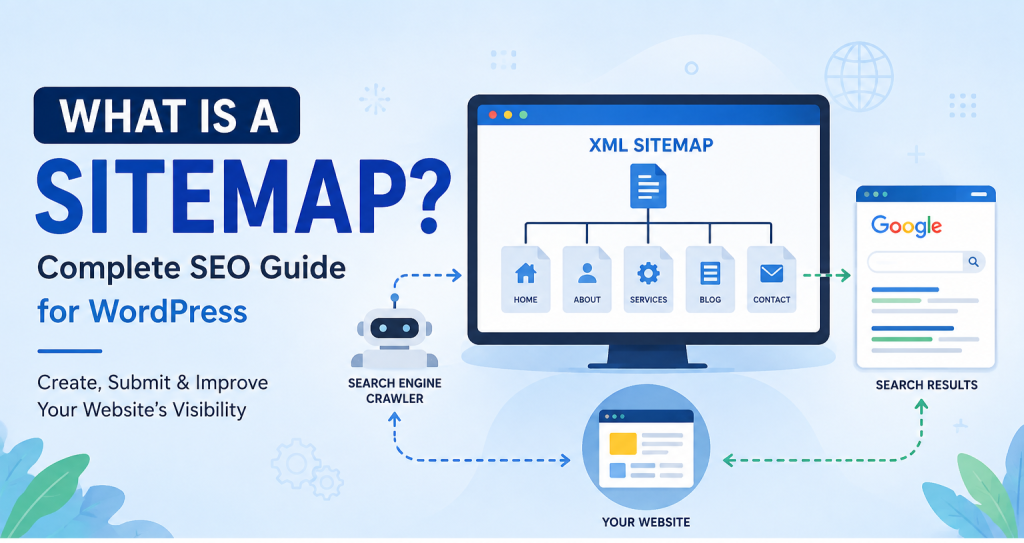
A Sitemap is an important part of a website’s technical SEO structure. It provides search engines with a structured list of URLs that you want them to discover and consider for crawling.
For websites built with WordPress, a Sitemap can be generated automatically by WordPress itself or managed through SEO plugins such as Rank Math or Yoast SEO.
A XML does not guarantee higher Google rankings. Its main purpose is to help search engines discover important pages, posts, and other indexable content more efficiently.
In this complete guide, you’ll learn what a XML is, why it is important for SEO, how to create one in WordPress, how Rank Math and Yoast handle Sitemaps, and how to submit your Sitemap to Google Search Console.
What Is a Sitemap?
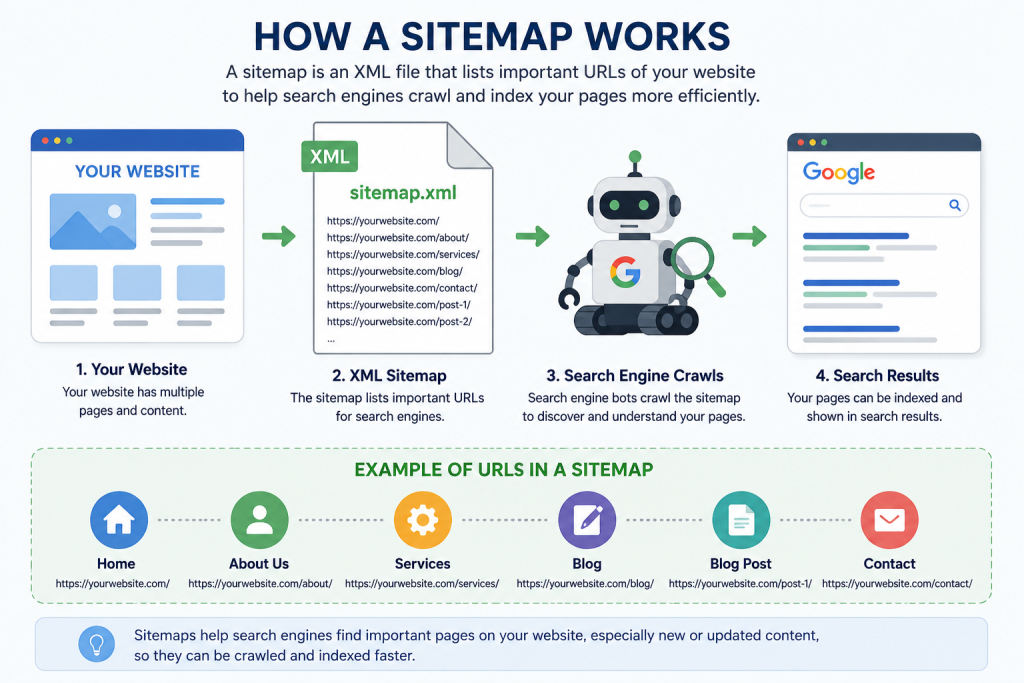
A XML is a file that lists important URLs available on a website. It helps search engines such as Google discover pages, posts, and other content that you want to make available for crawling.
Most modern Sitemaps use XML format.
A Sitemap may contain URLs for:
- Important pages
- Blog posts
- Categories
- Custom post types
- Other indexable content
For example, a Sitemap may be available at a URL such as:
https://example.com/sitemap_index.xml
The exact URL depends on how your website and SEO plugin are configured.
Some websites may use:
https://example.com/wp-sitemap.xml
while SEO plugins such as Rank Math or Yoast SEO commonly use a Sitemap Index.
Why Is a Sitemap Important for SEO?
A Sitemap is not a direct Google ranking factor that automatically pushes a website higher in search results.
Instead, its primary purpose is to help search engines discover important URLs.
This can be particularly helpful for websites that are new, large, frequently updated, or have pages that are not easily discovered through internal links.
Here are seven important ways a Sitemap can support your technical SEO.
1. Helps Search Engines Discover New Websites
New websites often have limited backlinks and fewer signals pointing search engines toward their pages.
A Sitemap can provide search engines with a structured list of important URLs that exist on the website.
However, a Sitemap should support—not replace—good internal linking and a crawlable website structure.
2. Helps Large Websites Organize Important URLs
Large websites can contain hundreds, thousands, or even millions of URLs.
For these websites, helping search engines identify important content can become more challenging.
A properly configured Sitemap gives search engines an organized source of URLs that are intended to be discoverable.
3. Helps Search Engines Discover New Content
When you publish a new blog post or update an important page, your Sitemap may provide another way for search engines to discover that URL.
This is especially useful when combined with:
- Strong internal linking
- Crawlable navigation
- Quality content
- A properly configured robots.txt file
- Correct canonical URLs
A Sitemap alone does not guarantee immediate crawling or indexing.
4. Helps Search Engines Identify Important URLs
Your Sitemap should primarily contain URLs that are important and suitable for search engine indexing.
For example, if you have an important service page that you want to appear in Google, including that URL in your Sitemap can make sense.
On the other hand, pages intentionally excluded from search engine indexing generally should not be included simply for the sake of having more URLs in the Sitemap.
5. Makes Sitemap Monitoring Possible in Google Search Console
After submitting your Sitemap through Google Search Console, you can monitor its processing status.
This can help you identify potential Sitemap-related issues and understand whether Google is able to process the submitted Sitemap.
Keep in mind that the number of URLs discovered from a Sitemap does not necessarily mean that all those URLs will be indexed.
6. Supports a Better Technical SEO Structure
A Sitemap is one component of technical SEO.
A healthy technical SEO setup should also consider:
- Crawlability
- Indexability
- Canonical URLs
- Internal linking
- Robots.txt
- Page performance
- Mobile usability
- Website architecture
Using a Sitemap together with these practices creates a more organized technical SEO foundation.
7. Can Be Useful for Frequently Updated Websites
Websites that regularly publish new content can benefit from having an automatically maintained Sitemap.
For example:
- News websites
- Blogs
- Ecommerce websites
- Service websites
- Publishing websites
When new content is added, an automatically generated Sitemap can help keep the list of important URLs up to date.
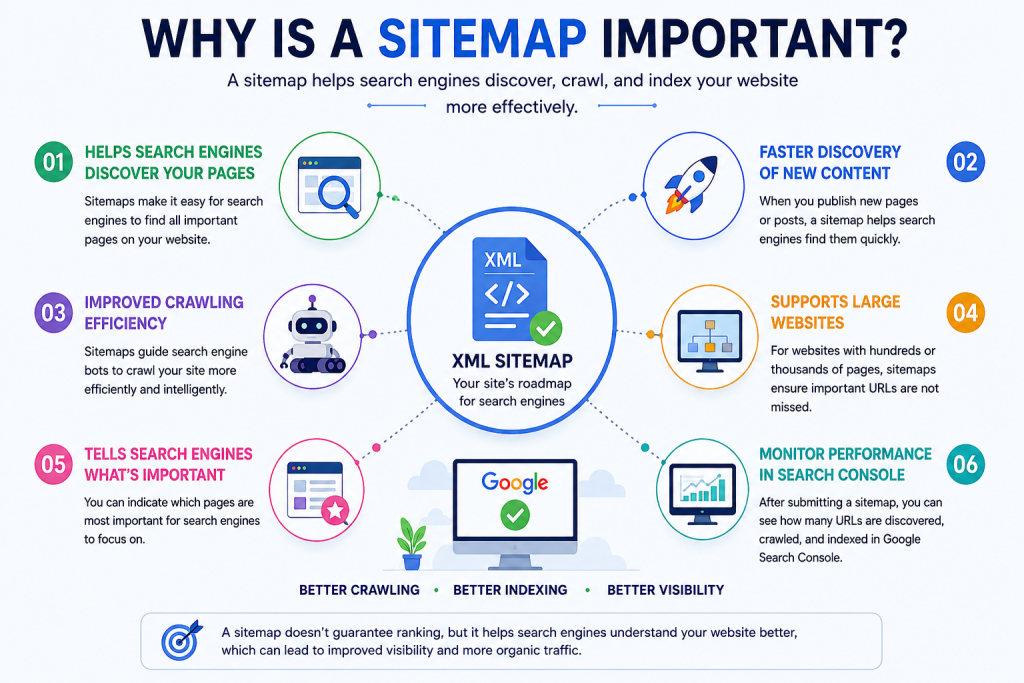
Website → XML Sitemap → Search Engine → Crawling → Indexing
How Is a Sitemap Created in WordPress?
If your website uses WordPress, you usually do not need to manually create an XML Sitemap from scratch.
Modern WordPress websites can generate a basic Sitemap automatically.
SEO plugins can also provide additional Sitemap management and configuration options.
There are two common approaches.
Method 1: WordPress Built-In Sitemap
WordPress can automatically generate a basic Sitemap.
A typical WordPress Sitemap URL is:
https://yourdomain.com/wp-sitemap.xml
Replace yourdomain.com with your actual domain.
For example:
https://example.com/wp-sitemap.xml
How to Check It
Open the Sitemap URL directly in your browser.
If the Sitemap is available, you should see XML Sitemap information rather than a normal webpage.
If the URL does not work, check your WordPress configuration, SEO plugin settings, caching, redirects, and server configuration.
Method 2: Create and Manage a Sitemap with Rank Math
If you use Rank Math SEO, the plugin can automatically generate and manage your Sitemap.
The exact menu labels may vary slightly depending on your Rank Math version and configuration.
Step 1: Log In to WordPress
Open your WordPress administration dashboard.
Step 2: Open Rank Math Sitemap Settings
Navigate to the Sitemap settings inside Rank Math.
This area allows you to configure Sitemap-related options.
Step 3: Make Sure Sitemap Functionality Is Enabled
Check that the Sitemap feature is enabled.
Your Sitemap configuration should include the content types that you actually want search engines to discover.
Step 4: Find Your Sitemap URL
Rank Math commonly generates a Sitemap Index.
A common URL format is:
https://yourdomain.com/sitemap_index.xml
Use the exact Sitemap URL generated by your website.
Step 5: Test Your Sitemap
Open the Sitemap URL in a browser.
A Sitemap Index may contain separate Sitemap files for different content types, such as posts or pages.
If the Sitemap loads correctly, it is generally ready to be submitted to Google Search Console.
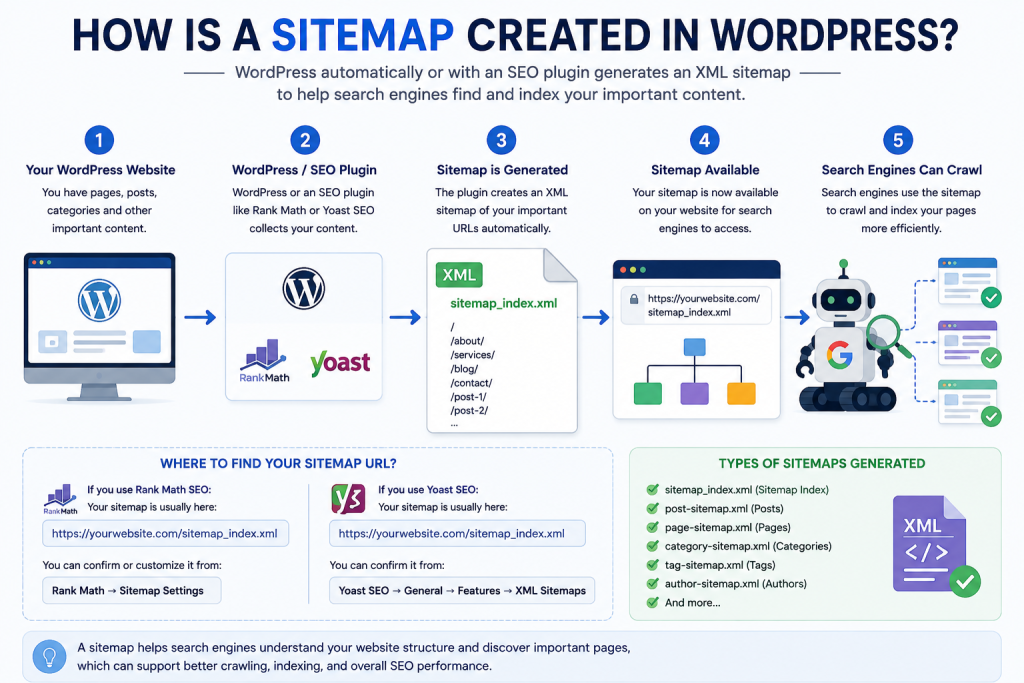
WordPress → Rank Math → Sitemap Settings → Sitemap Index
How to Find a Sitemap with Yoast SEO
Yoast SEO can also automatically generate a Sitemap for WordPress websites.
The Sitemap Index commonly uses a URL similar to:
https://yourdomain.com/sitemap_index.xml
Open the generated URL in your browser to check whether the Sitemap is available.
Rank Math vs Yoast Sitemap
If you are using Rank Math as your primary SEO plugin, you generally do not need Yoast SEO to perform the same Sitemap management functions.
Running multiple SEO plugins with overlapping features can create unnecessary configuration complexity.
For a cleaner setup, choose one primary SEO plugin and configure it properly.
What Is the Difference Between wp-sitemap.xml and sitemap_index.xml?
This is a common question for WordPress website owners.
A basic WordPress Sitemap may use:
wp-sitemap.xml
An SEO plugin such as Rank Math may instead generate:
sitemap_index.xml
The important point is not which URL looks better.
The important point is to use the actual Sitemap URL generated by your website.
Do not submit a Sitemap URL simply because you saw it on another WordPress website.
How to Submit a Sitemap to Google Search Console
Once your Sitemap is working correctly, you can submit it through Google Search Console.
Step 1: Open Google Search Console
Sign in to the Google Search Console property that represents your website.
Make sure you select the correct website property before submitting anything.
Step 2: Open the Sitemaps Section
In Google Search Console, open the Sitemaps section under the indexing-related tools.
Step 3: Enter Your Sitemap Path
If your Sitemap is:
https://example.com/sitemap_index.xml
you normally enter:
sitemap_index.xml
in the Sitemap submission field.
If your Sitemap is:
https://example.com/wp-sitemap.xml
you would enter:
wp-sitemap.xml
Use the actual Sitemap generated by your website.
Step 4: Submit the Sitemap
Submit the Sitemap and wait for Google to process it.
After submission, monitor the Sitemap status inside Google Search Console.
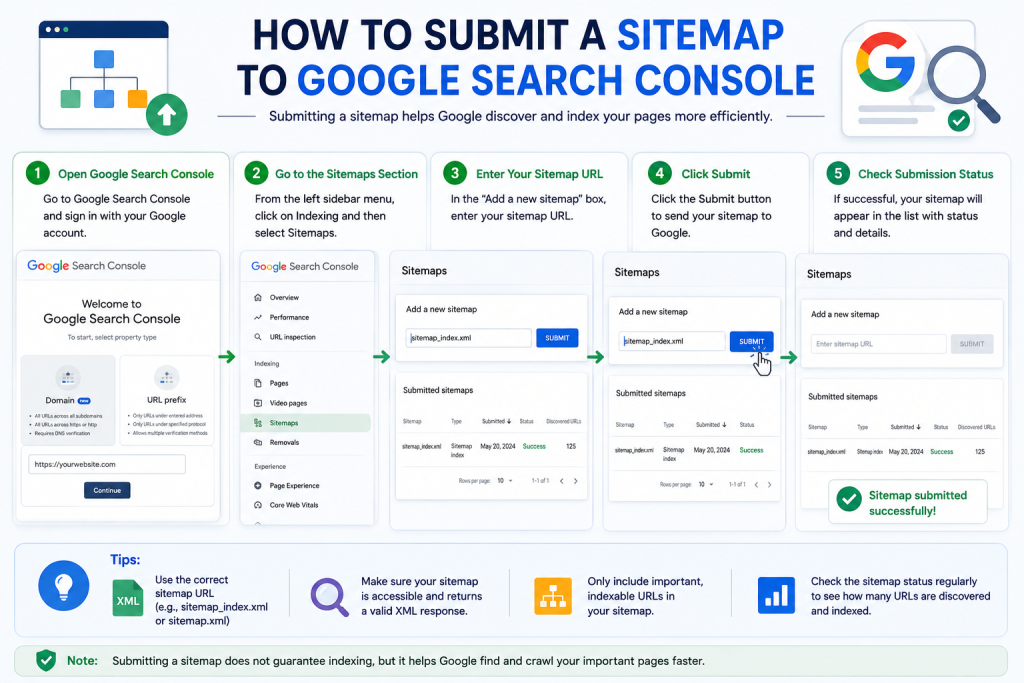
Google Search Console → Sitemaps → Add a new sitemap → Submit
What Should You Do After Submitting a Sitemap?
Submitting a Sitemap is only one step in technical SEO.
Do not expect every URL to be indexed immediately after submission.
Google decides which URLs to crawl and index based on many factors.
After submitting your Sitemap, check the following:
Create Strong Internal Links
Connect important pages with relevant internal links.
This helps users and search engines navigate your website.
Check Canonical URLs
Make sure important pages use appropriate canonical URLs and that duplicate versions are handled correctly.
Review Robots.txt
Make sure your robots.txt configuration is not accidentally preventing search engine crawlers from accessing important content.
Check Noindex Settings
Important pages should not accidentally have a noindex directive.
Improve Core Web Vitals
Website performance and page experience are also important parts of technical SEO.
Publish Helpful Content
Create original, useful content that satisfies the search intent of your audience.
Important Sitemap Best Practices
A good Sitemap should contain URLs that are:
- Important to your website
- Canonical
- Crawlable
- Suitable for indexing
- Accessible to search engines
- Relevant to your website
Avoid filling your Sitemap with unnecessary URLs.
For example, you generally should not intentionally include:
- Duplicate URLs
- URLs you want to keep out of search results
- Unnecessary parameter URLs
- Redirecting URLs
- Broken URLs
- URLs blocked from crawling
- Pages that are intentionally noindex
Example
Suppose you have an important service page:
https://seowithraju.xyz/technical-seo/
If the page is canonical, crawlable, indexable, and intended to appear in search results, including it in your Sitemap makes sense.
But if a page is intentionally set to noindex, including it in the Sitemap can send mixed signals and should generally be avoided.
Good Sitemap URLs vs Unnecessary Sitemap URLs
Good:
✓ Canonical URL
✓ Indexable page
✓ Important content
✓ 200-status URL
Avoid:
✗ Duplicate URL
✗ Noindex URL
✗ Redirect URL
✗ Broken URL
Is a Sitemap a Google Ranking Factor?
A Sitemap should not be treated as a shortcut to higher Google rankings.
Submitting a Sitemap does not guarantee:
- Higher rankings
- First-page rankings
- Immediate indexing
- Indexing of every submitted URL
- More organic traffic
The primary purpose of a Sitemap is to help search engines discover URLs.
Your overall search visibility depends on many other factors, including:
- Helpful and original content
- Search intent
- Keyword targeting
- Internal linking
- Technical SEO
- Crawlability
- Page experience
- Website authority
- Backlinks
- Site structure
Therefore, think of a Sitemap as one useful component of a broader SEO strategy.
Sitemap Checklist
Before submitting your Sitemap to Google Search Console, use this checklist:
☐ Sitemap has been generated
☐ Sitemap URL opens correctly
☐ Important URLs are included
☐ Duplicate URLs are excluded
☐ Unnecessary URLs are excluded
☐ Noindex URLs are not unnecessarily included
☐ Important pages are crawlable
☐ Canonical URLs are configured correctly
☐ robots.txt is not blocking important content
☐ The correct Google Search Console property is selected
☐ Sitemap has been submitted
☐ Sitemap processing status is monitored
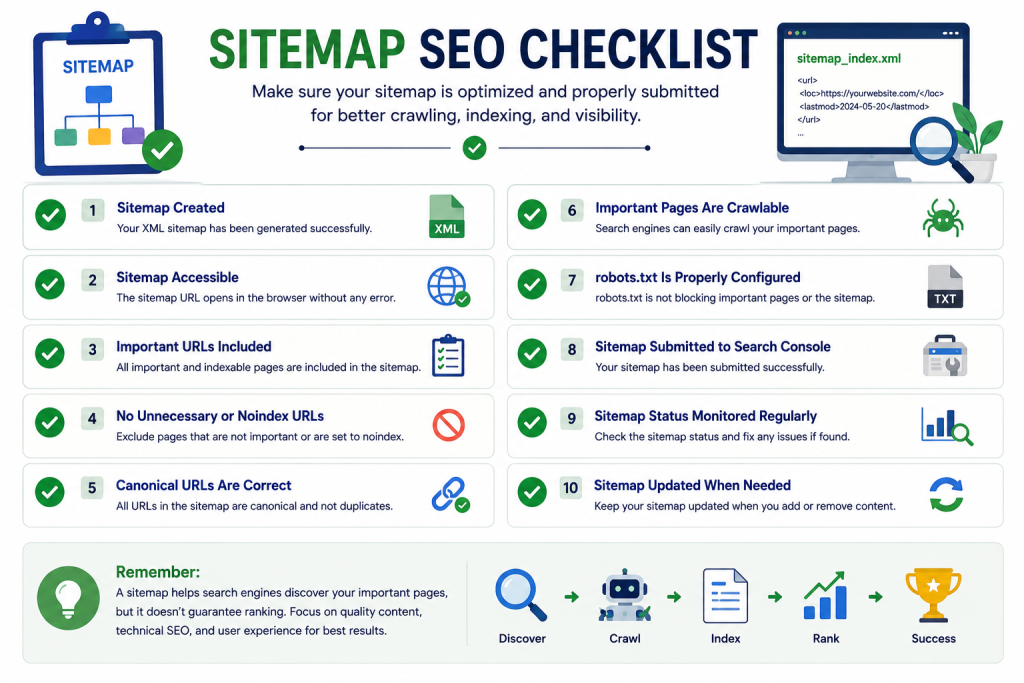
Sitemap SEO Checklist
✓ Create Sitemap
✓ Check Sitemap URL
✓ Include important URLs
✓ Remove unnecessary URLs
✓ Check canonical tags
✓ Check robots.txt
✓ Check noindex settings
✓ Submit to Google Search Console
✓ Monitor Sitemap status
Suggested ALT Text:
Sitemap SEO checklist for WordPress and Google Search Console
Frequently Asked Questions About Sitemaps
What is an XML Sitemap?
An XML Sitemap is a structured file that contains URLs from a website and helps search engines discover content that is intended to be crawled.
Does every WordPress website need a Sitemap?
A Sitemap is useful for many websites, particularly new, large, or frequently updated websites. WordPress can generate a basic Sitemap automatically, while SEO plugins can provide additional Sitemap management.
What is the difference between wp-sitemap.xml and sitemap_index.xml?
wp-sitemap.xml is commonly associated with WordPress’s built-in Sitemap functionality, while sitemap_index.xml is commonly used by SEO plugins such as Rank Math and Yoast SEO.
The correct URL depends on your website configuration.
Does submitting a Sitemap guarantee indexing?
No. Submitting a Sitemap does not guarantee that Google will crawl or index every submitted URL.
Google evaluates many other factors, including content quality, canonicalization, crawlability, internal links, and indexing signals.
Does a Sitemap improve Google rankings?
A Sitemap should not be considered a direct ranking shortcut. Its primary role is helping search engines discover important URLs.
How do I submit a Sitemap to Google?
Open Google Search Console, select the correct property, go to the Sitemaps section, enter the Sitemap path, and submit it.
Should noindex pages be included in a Sitemap?
Generally, a Sitemap should focus on URLs that you want search engines to discover and potentially index. Intentionally noindexed pages generally should not be included.
Can I use Rank Math and Yoast SEO together?
It is generally better to use one primary SEO plugin rather than running multiple plugins with overlapping SEO functions. This can reduce configuration complexity and potential conflicts.
Conclusion
A Sitemap is an important part of a well-structured technical SEO strategy. It gives search engines a structured way to discover important URLs on your website.
If you use WordPress, you generally do not need to create an XML Sitemap manually. WordPress can generate a basic Sitemap automatically, while SEO plugins such as Rank Math and Yoast SEO can provide additional Sitemap functionality.
After confirming that your Sitemap works correctly, you can submit it through Google Search Console and monitor its processing status.
However, a Sitemap is only one part of SEO.
For better search visibility, combine a properly configured Sitemap with helpful content, strong internal linking, correct canonical URLs, crawlable pages, appropriate robots.txt settings, good website performance, and a strong overall technical SEO foundation.
A well-maintained Sitemap can help search engines discover your important content—but sustainable SEO results come from the quality and structure of the entire website.
Good luck 🤞
Thank you